
Cisco Meraki vs UniFi: dashboards, cost, and certifications
Technical Terrence · for the office and home
Intro
Cisco Meraki and Ubiquiti UniFi both sell a full stack — a gateway, switches, and access points — that you manage from a browser instead of logging into every box. They are not the same kind of product. Meraki is a cloud-managed platform: devices check in to Cisco’s cloud, and you work in the Meraki dashboard. UniFi is a hybrid, edge-first platform: you run UniFi OS and the UniFi Network application on a local console (or a supported host), and you can optionally use UniFi Site Manager in the cloud to reach many sites at once.
This article is a comparison, not a setup walkthrough. For the click-path to stand up each stack, use Cisco Meraki Training and Ubiquiti UniFi Training. The goal here is to help you pick a side before you buy, with three questions in mind:
- What does each vendor actually call its “dashboard”?
- What does the license, support, and warranty model look like in practice?
- Which government and industry certifications does each vendor publish today — and which ones are missing?
That last question matters. A couple of years ago, UniFi was already a strong fit for a small office or a home A/V rack, but public government and industry certifications were hard to find. As of November 2026, that gap is still the main documented difference. Meraki publishes a long list of cloud and platform attestations, plus a separate FedRAMP-authorized U.S. Government region. UniFi publishes an edge-first Trust Center, NDAA language for most products, and guidance for building PCI DSS or HIPAA-oriented networks — but it does not publish SOC 2, ISO 27001, FedRAMP, FIPS, or Common Criteria certifications on its official Trust Center or Help Center.
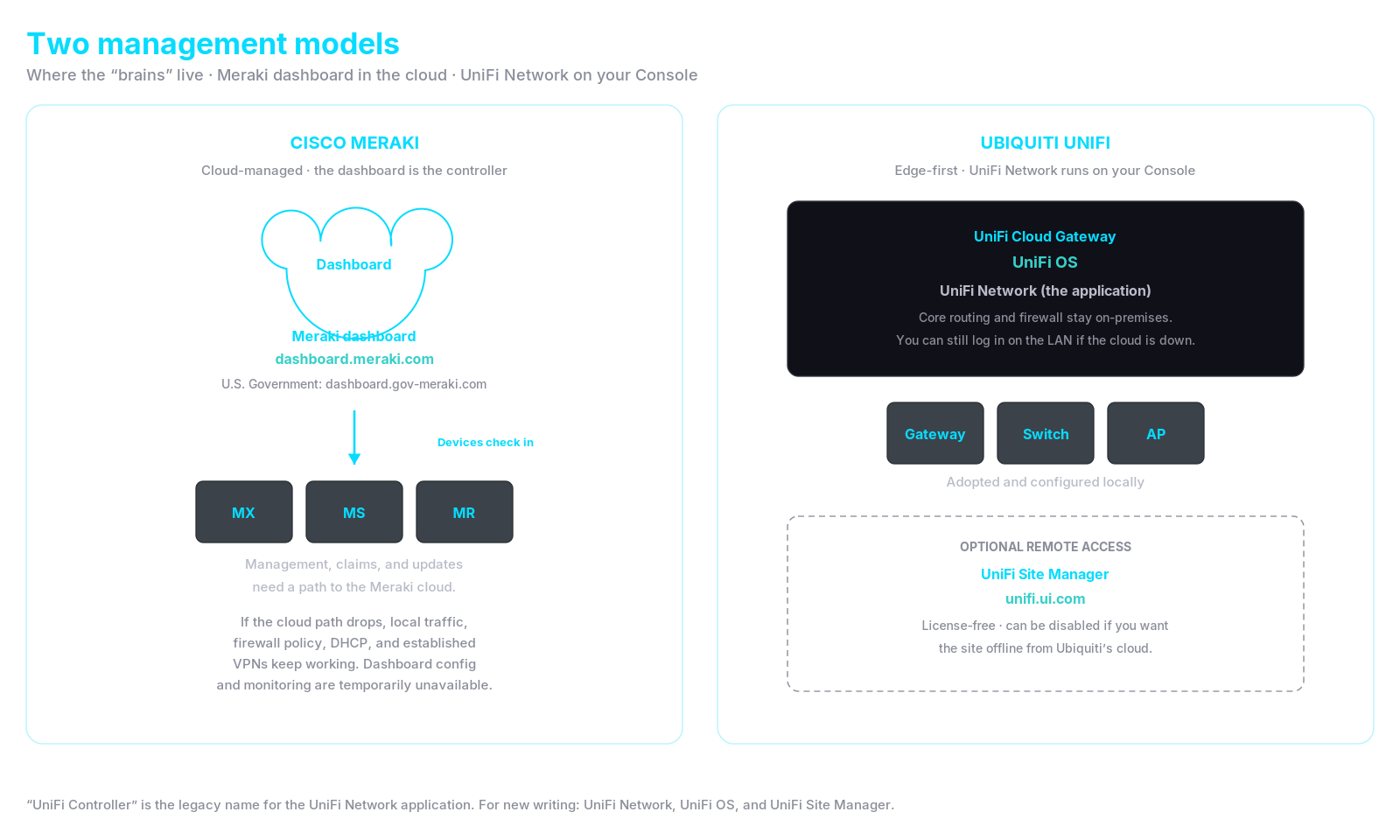
What each one calls its dashboard
People still say “the UniFi dashboard” or “the UniFi controller” in conversation. Ubiquiti’s current official names are more specific, and they are not one product.
| Role | Cisco Meraki | UniFi (current official names) |
|---|---|---|
| Cloud or multi-site portal | Meraki dashboard (also written Cisco Meraki Dashboard), at dashboard.meraki.com. Canada and India have in-country URLs (dashboard.meraki.ca, dashboard.meraki.in). The U.S. Government region is a separate service at dashboard.gov-meraki.com. |
UniFi Site Manager, at unifi.ui.com. Official Help Center copy calls this “your personalized dashboard associated with your UI Account.” The Trust Center also describes it as a “web dashboard.” It is the place you sign in to see every site you own or have been granted, then click into a site to manage it. |
| Where you configure the network | The same Meraki dashboard. Organizations hold inventory and licenses; networks hold the site config (MX, MS, MR, and so on). | The UniFi Network application (also written UniFi Network). This is the software that adopts gateways, switches, and access points, and pushes VLANs, SSIDs, and firmware. |
| The host operating system | Not a customer-installed OS. Devices are cloud-managed. | UniFi OS, which runs on a UniFi Console (Cloud Gateway, Cloud Key, and similar) and can also be self-hosted as UniFi OS Server. Other apps — Protect, Access, Talk, Connect — run on UniFi OS alongside Network. |
“UniFi Controller” is the legacy name. Official Introduction to UniFi wording is direct: if you have heard of a “UniFi Controller,” that is usually someone referring to the UniFi Network application by an informal name. You will still see “controller” in older docs, forum posts, and even some current inform-URL and port articles. For new writing, use UniFi Network (the application), UniFi OS (the console OS), and UniFi Site Manager (the cloud/multi-site portal).
Meraki’s name is simpler: one official management plane, the Meraki dashboard. Cisco’s getting-started checklist defines it as the centralized, web-based tool used to monitor and configure Meraki devices and services, sitting on top of the Meraki cloud.
The practical difference is where the “brains” live:
- On Meraki, the dashboard is the controller. Devices need a path to Meraki’s cloud to be managed, claimed, and updated. If the cloud path drops, official docs say local traffic, firewall policy, DHCP, and established VPNs keep working, but dashboard configuration and monitoring are temporarily unavailable. The local status page is a limited fallback, not a full local controller.
- On UniFi, the Network application runs on your Console or host. Official Trust Center and Site Manager articles describe this as a hybrid or edge-first design: core routing, firewall, and (for Protect) video storage stay on-premises. Site Manager is license-free remote management. If Ubiquiti’s cloud is unreachable, you can still log into the Console on the LAN (or through your own VPN). Remote access can be disabled if you want the site offline from Ubiquiti’s cloud.
For network engineers: UniFi Fabrics is a newer management layer on top of Site Manager for grouping sites under shared roles, identity-provider integration, and templates. It is worth knowing about for multi-site design, but it is not a replacement name for Site Manager or UniFi Network. Meraki’s closest containers remain organization (inventory and licenses) and network (the site).
Licensing and cost model
Do not shop these two on hardware price alone. The recurring model is the bigger long-term difference. This article does not quote list prices; those move by SKU, term, and region. Check the current Cisco/Meraki quote and the UI Store for numbers.
Cisco Meraki requires a valid license to manage the hardware. Official licensing documentation is blunt: current Meraki products need valid licensing to operate. A claimed MX, MS, or MR that is out of compliance is a licensing problem, not a cabling problem. Meraki currently documents three models, and you cannot mix them in one organization (see Licensing basics in the training guide):
- Co-termination (co-term). Prepaid terms are typically 1, 3, 5, or 7 years. Licenses pool into one organization expiration date. Official comparison material describes an organization shutdown if the org is out of compliance.
- Subscription. Claiming a subscription key moves the organization to this model. Licenses are handled per subscription, at the network level. Official docs describe Amber Mode if you fall out of compliance: management can be disabled while traffic continues to forward.
- Per-device licensing (PDL). Official docs say this is no longer available for customers who would want to move to it in regions where Subscription is offered. Existing PDL orgs still exist.
The license is also how you get dashboard access, firmware, and support. Hardware warranty is separate from the license (a device can still be in license but out of warranty, and the other way around).
UniFi does not charge a mandatory base license to manage the network. Official Site Manager and Introduction to UniFi pages describe remote management and Site Manager as license-free. You buy the hardware, run UniFi OS / UniFi Network on a Console, a Cloud Key, a self-hosted host, or Official UniFi Hosting, and you can keep managing the site locally without a renewal clock on every switch and AP.
Optional UniFi costs that are subscriptions, when you choose them:
- Official UniFi Hosting, a paid cloud-hosted Network application (and Talk Relay) if you do not want a local Console or self-hosted server. Official Help Center says you pick a plan by device count; the published range is 100 to 1,000 devices. This is separate from license-free Site Manager. If you cancel, official docs say the hosted instance stays up until the end of the prepaid period, then is terminated.
- Professional Site Support, a paid per-site phone-support upgrade, activated in Site Manager. See Support, warranty, and SLA.
- Feature add-ons that Ubiquiti sells separately (for example, expanded threat-intelligence options mentioned in UniFi’s PCI article). Those are optional and are not required to adopt devices or run UniFi Network.
In short: Meraki’s dashboard and support are bundled into a mandatory license. UniFi’s base management is included with the hardware and the host you already run; you pay extra only if you want Ubiquiti to host the controller or if you want paid phone support.
Dashboard and multi-site management
Meraki is built as a multi-site cloud app from the first login. You create an organization, create a network per site (or a combined-hardware network for a small office), claim devices by order claim key or Meraki serial / Cloud ID, and the boxes pull config once they have an internet uplink. You can often stage most of the config before the hardware arrives. Firmware, inventory, and licensing all live in the same dashboard. Regional hosting is chosen when you create the organization and is not something you casually move later.
UniFi splits the job:
- Day-to-day config for one site happens in UniFi Network on that site’s host (or in Official UniFi Hosting).
- UniFi Site Manager (
unifi.ui.com, or the UniFi mobile app) is the multi-site layer: sign in with a UI account, see every site you own or administer, jump into a site, push updates across sites, assign admins, and use extras such as Site Magic SD-WAN and the Site Manager API. - A UI account is optional during first setup, but official docs strongly recommend it for Site Manager, cloud backups, and notifications.
If you only have one small office, both feel like “a dashboard in a browser.” The difference shows up when the internet path to the vendor is down, or when you grow to many sites. Meraki stays centralized in Cisco’s cloud (with a limited local status page). UniFi can still be fully administered on the LAN. For a distributed org, Meraki’s organization/network model and UniFi’s Site Manager (and, at larger scale, Fabrics) are the two official answers — not a missing feature on either side.
Support, warranty, and SLA
This is the other place Meraki’s license fee is doing work, and where UniFi’s standard offering is thinner unless you buy the paid tier.
Cisco Meraki support is included with a valid device license. Official process documentation says customers may open cases by phone, chat, dashboard, or web form. Meraki support is described as operating 24×7 from multiple support centers. The same page is more precise about urgency: for basic and standard support, 24/7 assistance is documented for severity 1 or 2 issues when you use a phone option or the support hotline; other cases are documented as receiving a response during business hours. Cisco also documents a higher Signature support tier. The Meraki cloud itself is covered by a published 99.99% uptime SLA on the Meraki Trust page. In a cloud outage, official architecture language says user traffic continues to flow; dashboard management is what you lose until the cloud path returns.
The U.S. Government region has its own support team, with official “US Person/Soil” requirements, a published phone number, and its own business-hours and after-hours severity targets. That is a separate service from the commercial dashboard.
Meraki hardware warranty is documented separately from licensing. Official RMA/warranty documentation gives these general guidelines (always confirm the datasheet; the table is labeled as not final):
- Lifetime (until the product end-of-support date) for MX or Z-series, MG, MS/CS, and indoor MR/CW.
- 1 year for outdoor MR/CW and for most accessories.
- 3 years for first-generation MV cameras and for MT sensors; 5 years for MV Gen 2 and later (with MV2 called out as a 3-year exception).
- 2 years for C8000-G2 Series Secure Routers.
Warranty RMAs go through Meraki Support. Advance replacement for lifetime-warranty products is documented as shipping within one business day on a best-effort basis unless you have purchased a Cisco RMA upgrade.
UniFi standard support is free 24/7 chat and email. Official Help Center language: all UniFi customers get free 24/7 chat and email technical support; more complex cases can be escalated to higher-tier engineers. RMA requests go through rma.ui.com and follow warranty eligibility.
Paid UniFi phone support is Professional Site Support (also called Site Support on ui.com/site-support). It is optional, sold per physical site, and activated in Site Manager. Official marketing describes 24-hour or business-hours phone plans, plus video call and email, with a named engineer. Partner Phone Support is a separate path for MSPs and integrators through the UniFi Partner Portal. Official pages do not all use the same geographic wording (one Help Center article says eligible deployments in the US, Canada, and Europe; the Site Support product page says available globally with limited exceptions). Check the current Site Manager offer and ui.com/site-support before you count on coverage at a given address.
UniFi hardware warranty is shorter than Meraki’s lifetime terms. Official limited-warranty language (updated October 9, 2020, and still the posted policy as of this guide):
- Two years from delivery for products purchased directly from an official Ubiquiti webstore (
store.ui.com). - One year from shipment to the authorized distributor or reseller for products bought through that channel.
- Products from unauthorized sellers are not covered by Ubiquiti’s warranty.
There is no official “lifetime hardware warranty” on the UniFi warranty page, and no published cloud uptime SLA equivalent to Meraki’s 99.99% figure. That is a real tradeoff, not a documentation gap you can assume away.
Small office and home A/V setups
This is where UniFi is the standout fit, and it is the reason many integrators reach for it first.
A small office or a serious home rack usually wants: a gateway, a PoE switch, a few access points, maybe cameras, and one place to manage them — without a renewal on every device. UniFi maps to that list cleanly:
- No mandatory license to keep UniFi Network, the switches, or the APs manageable.
- Local control on a Cloud Gateway or Cloud Key, so the site does not depend on Ubiquiti’s cloud for day-to-day routing, Wi-Fi, or (with Protect) video.
- PoE switching and access points in the same adoption flow as the gateway, which is what you want when cameras, access readers, or APs share a rack and a switch.
- UniFi Protect, Access, Talk, and Connect run on UniFi OS. Protect stores video on the local NVR or console, not in Ubiquiti’s cloud. That combination — network plus cameras plus door access, locally hosted — is why UniFi shows up so often in small-office and home A/V or custom-integrator racks.
- Site Manager is optional. You can leave remote access off and manage the Console on the LAN, or turn it on when you want phone-app access without standing up your own VPN.
Meraki can also do a small office well: the dashboard is polished, zero-touch claim-and-assign is straightforward, and included support is a genuine advantage when something breaks at 11 p.m. The recurring license, the cloud dependency for management, and the weaker local-control story are the usual reasons it is a harder sell for a home lab, a residential A/V rack, or a small office that wants to own the controller and stop paying after the hardware is paid off.
Meraki also sells cameras (MV) and sensors (MT), but those are licensed products, and official U.S. Government region docs do not support MV or MT in that cloud. They are not the same “one license-free local stack” story.
If the site is a single office, a home, or a light multi-site setup, and you do not have a contract that names FedRAMP, a BAA, or a vendor SOC 2 report, UniFi is usually the more practical starting point. Use the Ubiquiti UniFi Training walkthrough when you are ready to rack it.
Regulated, enterprise, and government environments
This is where Meraki’s certifications, compliance paperwork, and included support are the reason the license exists.
Choose Cisco Meraki — and, for U.S. federal and many contractor use cases, the Cisco Meraki US Government region — when any of the following are true:
- A federal, state, or local requirement names FedRAMP, or you need a cloud service that is actually listed on the FedRAMP Marketplace.
- An auditor or security team asks for a vendor SOC 2 Type II, ISO/IEC 27001 (and the related 27017/27018 cloud/PII controls), or a PCI DSS v4.0 certification of the management platform itself — not only a customer-built compliant LAN.
- You need FIPS 140-validated cryptography for device-to-cloud connectivity, on a published SKU and firmware list.
- You want 24/7 vendor phone support included with the license, a published cloud uptime SLA, and lifetime hardware warranty on the core MX/MS/indoor-MR set.
- The organization already standardizes on Cisco and wants one dashboard for many sites, with config staged before the hardware lands.
The important catch: commercial Meraki (dashboard.meraki.com) and Meraki for Government (dashboard.gov-meraki.com) are not the same service. Official docs say accounts, organizations, and membership do not cross over. FedRAMP Class C (Moderate) is documented for the U.S. Government region. If a contract requires FedRAMP, buying commercial Meraki and assuming you are “in FedRAMP” is the wrong move. Eligible customers should work a Cisco account representative and use the government region.
Choose UniFi in a regulated environment only after you have read the official Trust Center and the UniFi for Enterprise article, and after your own assessor agrees the gaps are acceptable. UniFi can help you build a PCI DSS- or HIPAA-oriented network (segmentation, encryption, logging, MFA on UI accounts, and so on). Most UniFi products are documented as meeting NDAA procurement standards, with the caveat that you must check the specific model’s specifications. What UniFi does not currently give you, on official public pages, is the pack of third-party cloud attestations many government and healthcare RFPs treat as mandatory.
For network engineers: treat “we can support a PCI or HIPAA environment” as a shared-responsibility statement, not as a substitute for the vendor’s own SOC 2, FedRAMP, or FIPS package. If the RFP requires those artifacts, Meraki (often the Government region) is the one of these two that actually publishes them. If the requirement is local control, no cardholder or video data in a vendor cloud, and NDAA-aware hardware, UniFi may still be the better architecture — but that is a design and assessor decision, not a certification you can print from the Trust Center.
Government and industry standards
The table below separates cloud and platform attestations (what is true of the vendor’s management service) from hardware and cryptography claims (what is true of a specific device or firmware). “Not published” means it was not found on the official Trust Center, Trust page, Help Center, or government marketplace as of November 2026 — not that a private document cannot exist behind a customer portal. Always re-check before a bid.
| Standard or program | Cisco Meraki | Ubiquiti UniFi |
|---|---|---|
| FedRAMP | Yes, for the U.S. Government region. The FedRAMP Marketplace lists Cisco Meraki US Government Region as FedRAMP Certified, Class C (Moderate), Rev5, certified since February 18, 2025 (page last updated November 23, 2026). Official Meraki docs describe this as an Authorization to Operate at the Class C (Moderate) level, at dashboard.gov-meraki.com. Cisco also markets this as FedRAMP Moderate ATO. This does not automatically cover a commercial organization on dashboard.meraki.com. |
Not published. No UniFi or Ubiquiti cloud service appears in the official materials reviewed for this guide, and the Trust Center does not claim FedRAMP. |
| StateRAMP / GovRAMP | Yes, with current naming. Cisco’s Meraki for Government page states StateRAMP alongside FedRAMP. GovRAMP is the successor program to StateRAMP. The official GovRAMP Authorized Product List includes Cisco Meraki for Government as SaaS, Moderate, Authorized. | Not published on official Ubiquiti Trust Center or Help Center pages reviewed for this guide. |
| SOC 2 Type II | Yes (platform). The Meraki Trust page lists a SOC 2 Type II report for the Meraki dashboard. Reports are obtained from the Cisco Trust Portal (search “Meraki”). The Trust page also notes that the data centers used by the service maintain SOC 2 (and other) certifications. | Not published on the official Trust Center (last updated July 13, 2026) or the UniFi for Enterprise compliance article. |
| ISO/IEC 27001, 27017, 27018 | Yes (platform). The Meraki Trust page lists ISO/IEC 27001 (ISMS), 27017 (cloud security controls), and 27018 (PII in the cloud) among Meraki dashboard certifications. ISO/IEC 27701 is not listed on that page. | Not published as an ISO/IEC 27001 (or 27701) certification of UniFi’s cloud or applications. Ubiquiti’s public compliance page is mostly radio, safety, and environmental filings; “ISO Factories” there is about manufacturing, not an ISMS certificate for Site Manager. |
| PCI DSS | Two different claims, both official. (1) The Meraki dashboard is PCI DSS v4.0 certified (platform attestation on the Trust page). (2) Meraki also documents features that help a customer build a PCI-oriented wireless LAN, and states that user traffic does not traverse Meraki data centers. A dashboard certification is not the same thing as your cardholder environment being in-scope or compliant. | Capabilities, not a published platform certification. Official UniFi PCI article: Ubiquiti does not store, process, or transmit cardholder data, and UniFi provides tools (firewall, VLANs, encryption, logging, and so on) to help you build a PCI-compliant environment. The Trust Center does not claim that Site Manager or Official UniFi Hosting is itself PCI DSS certified. |
| HIPAA / BAA | Features and architecture, not a “HIPAA certification.” Official Meraki documentation lists controls that can aid a HIPAA-oriented network and states that no Individually Identifiable Health Information on the network is sent to the Meraki cloud. HIPAA is a customer obligation; it is not a product certification. A signed Business Associate Agreement, if you need one, is a legal step with Cisco — see Not fully verified. | Capabilities, not a published certification or BAA. The UniFi for Enterprise article says UniFi provides capabilities that can be used to build and maintain a HIPAA-compliant environment. No official public HIPAA certification or standard customer BAA was found on the Trust Center or Help Center. |
| FIPS 140-2 / FIPS 140-3 | Yes, for listed hardware and firmware, as cryptography — not as a blanket dashboard stamp. Official Meraki docs: device-to-cloud connectivity uses FIPS 140-validated cryptography only when both the SKU and the firmware are on the published FIPS list. The U.S. Government region offers only FIPS 140-compliant firmware. Official guidance in 2026 is to move to FIPS 140-3 firmware; the FIPS 140-2 modules Meraki used were documented as moving to NIST “Historical” status in January 2026. Some older Cisco marketing pages still say “FIPS 140-2”; trust the current FIPS device/firmware list and the sunsetting notice. SKUs that are not on the list are documented as not FIPS 140 compliant. | Not published. No official UniFi FIPS 140-2 or FIPS 140-3 product or firmware list was found on the Trust Center or Help Center. |
| Common Criteria / NIAP | Not listed for Meraki. Cisco’s official Common Criteria certified-products table includes many Cisco platforms (Catalyst, Secure Firewall, and others). Meraki dashboard, MX, MS, and MR were not on that list in the November 2026 review. | Not published on official Ubiquiti Trust Center or Help Center pages reviewed for this guide. |
| NDAA procurement rules | Product-specific. Some official Meraki datasheets (for example, certain MV camera families) state NDAA compliance. That is not the same as a single platform-wide NDAA 889 letter covering every MX, MS, and MR. Check the datasheet for the exact SKU. | Most products, with a per-SKU check. Official NDAA article: most UniFi products comply with NDAA procurement standards, but you must verify each product’s technical specifications. Questions go to compliance@ui.com. |
| TAA (Trade Agreements Act) | Product-specific. Official U.S. Government region documentation calls out limited TAA compliance for the MS120, which is a useful reminder that TAA is not automatic across the catalog. Confirm TAA on the datasheet or with Cisco for the exact SKU, especially for federal procurement. | No public catalog list found. Official compliance inquiries go to compliance@ui.com. Do not assume a UniFi model is TAA-compliant without a declaration for that SKU. |
| Other notable listings | Meraki Trust page also lists BSI C5 (Germany), ENS (Spain), ACN Cloud Qualification QC1 (Italy), and ISMAP (Japan) for the dashboard. Government-region support and FIPS letters are documented separately. | UL 294 is documented for UniFi Access control hubs and readers. Ubiquiti’s privacy policy also states participation in the EU-U.S. Data Privacy Framework (and the UK extension). That is a privacy-transfer framework, not a substitute for FedRAMP, SOC 2, or FIPS. |
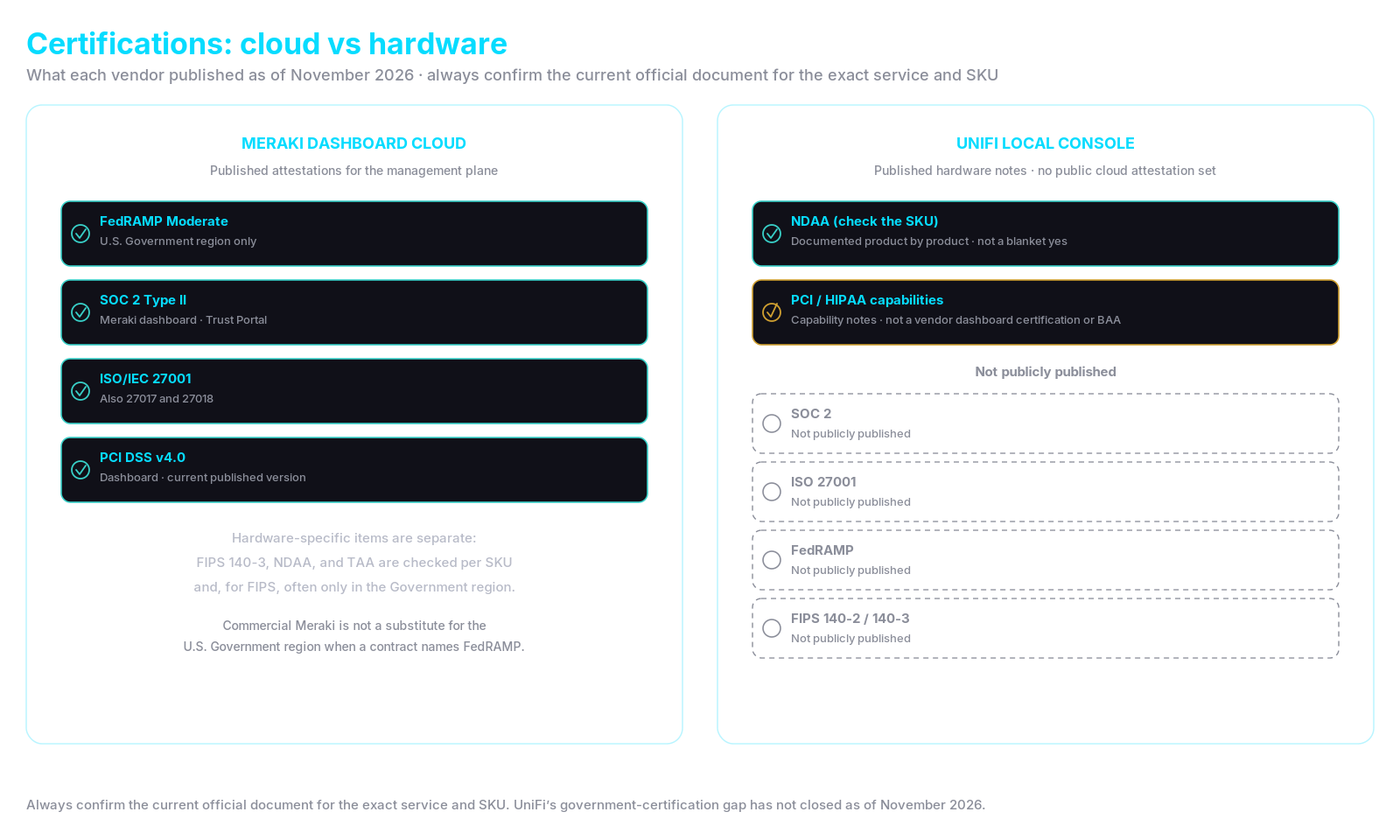
If you researched UniFi a couple of years ago and came away empty-handed on government certifications, the public picture in November 2026 is clearer, but it has not closed that gap. Ubiquiti now has a real Trust Center, an explicit NDAA page, and useful PCI/HIPAA capability articles. It still does not publish the FedRAMP, SOC 2, ISO 27001, FIPS, or Common Criteria attestations that Meraki puts on its Trust page and that the U.S. Government region carries in the FedRAMP Marketplace.
Which one should you pick?
| If this is your situation | Lean toward | Why |
|---|---|---|
| Small office, home lab, or home / custom A/V rack; you want PoE, cameras, and local control without a renewal on every device | UniFi | License-free UniFi Network and Site Manager, edge-first local management, and the Protect/Access stack on UniFi OS. Start with Ubiquiti UniFi Training. |
| You want the vendor to pick up the phone at 2 a.m. as part of the purchase, with a published cloud SLA and lifetime warranty on the core box set | Meraki | Support, dashboard, and firmware are bundled into the required license; official 99.99% cloud SLA; lifetime warranty on MX, MS, and indoor MR (confirm the datasheet). |
| Multi-site, but you still want a local controller and the option to cut off vendor cloud access | UniFi | Site Manager for the fleet, UniFi Network on each Console, full local admin if the cloud path is down. |
| Multi-site, zero-touch staging, and you are fine with cloud management as the source of truth | Meraki | One Meraki dashboard, organization and network containers, claim-and-assign before the hardware arrives. See Cisco Meraki Training. |
| Federal agency, many government contractors, or any RFP that names FedRAMP or FIPS 140 for the management path | Meraki US Government region (dashboard.gov-meraki.com) |
FedRAMP Class C (Moderate) on the official marketplace, GovRAMP Authorized at Moderate, FIPS 140-compliant firmware in that region, U.S. Person/Soil support. Commercial Meraki is not a substitute. |
| Healthcare, retail, or other audits that ask for the vendor’s SOC 2, ISO 27001, or a PCI DSS certification of the dashboard | Meraki (commercial or Government region, as the contract requires) | Those attestations are published for the Meraki dashboard and available through the Cisco Trust Portal. UniFi does not publish the same set. |
| You must have NDAA-aware hardware, and you will check each SKU | Either, with a datasheet check | Both vendors document NDAA language on a product-by-product basis. Neither should be assumed compliant on an unchecked model. |
| TAA procurement | Confirm the exact SKU | Meraki documents TAA limits on at least one switch family (MS120). UniFi does not publish a public TAA catalog; ask compliance@ui.com. |
There is no single winner. UniFi is the more practical stack for the office and home when you want to own the controller, add cameras without a second vendor, and avoid a mandatory license. Meraki is the more practical stack when the paperwork, the included support, and the cloud attestations are part of the job. If you need both local control and a FedRAMP-authorized cloud controller, neither of these two, used in its default commercial form, is a complete answer — you would be looking at Meraki’s Government region (cloud-managed, authorized) or at a different architecture altogether.
Before you buy
- You know which dashboard name you will actually use: Meraki dashboard (
dashboard.meraki.comordashboard.gov-meraki.com) versus UniFi OS + UniFi Network, with optional UniFi Site Manager (unifi.ui.com). - You have priced Meraki licenses for the full term (and the compliance behavior of co-term vs subscription), or you have accepted UniFi’s hardware-plus-optional-hosting-and-support model.
- You have read the warranty terms for the exact products (Meraki lifetime vs 1-year outdoor AP, UniFi 1- or 2-year depending on purchase channel).
- If a contract names FedRAMP, FIPS, SOC 2, ISO 27001, PCI DSS, HIPAA/BAA, NDAA, or TAA, you have checked the current official document for that exact service and SKU, not only this comparison.
- For Meraki government use, you are planning the U.S. Government region, not a commercial organization that you hope to “designate” later.
- For UniFi, you have picked a host (Cloud Gateway, Cloud Key, Official UniFi Hosting, or self-hosted) and decided whether Site Manager remote access will stay enabled.
Still stuck?
If you are choosing between these stacks for a specific office or home rack, message me with the site type (single small office, multi-site, home A/V, or a regulated / government requirement), whether a contract names FedRAMP, FIPS, SOC 2, or a BAA, and whether you need cameras on the same stack. Don’t send dashboard or UI account passwords, license keys, or a full bill of materials with serial numbers unless we have already agreed you should. Chat with Technical Terrence
Last updated: November 23, 2026
Sources checked
- Ubiquiti UniFi Training
- Cisco Meraki Training
- From the demarc to your desk
- Ubiquiti: Introduction to UniFi (includes the official note that “UniFi Controller” is an informal name for the UniFi Network application, and that Site Manager at unifi.ui.com is license-free)
- Ubiquiti: UniFi Remote Management via Site Manager
- Ubiquiti Trust Center (page states it was last updated July 13, 2026; describes Site Manager as a web dashboard at unifi.ui.com)
- Ubiquiti: UniFi for Enterprise — Reliability, Compliance, and Support
- Ubiquiti: National Defense Authorization Act (NDAA) Compliance
- Ubiquiti: UniFi PCI Compliance
- Ubiquiti: Getting Started with Official UniFi Hosting
- Ubiquiti: Support and User Responsibilities
- Ubiquiti: Professional Phone Support / Site Support
- Ubiquiti Limited Warranty
- Ubiquiti compliance filings
- Ubiquiti Privacy Policy (EU-U.S. Data Privacy Framework participation)
- Cisco Meraki: Getting started checklist (official “Meraki dashboard” definition and
dashboard.meraki.com) - Cisco Meraki Trust (SOC 2 Type II, ISO/IEC 27001/27017/27018, PCI DSS v4.0, FedRAMP Moderate, C5, ENS, ACN QC1, ISMAP, 99.99% SLA)
- Cisco Trust Portal
- Cisco Meraki for Government (FedRAMP / StateRAMP offer page)
- FedRAMP Marketplace: Cisco Meraki US Government Region
- GovRAMP program participants / Authorized Product List
- Cisco Meraki US Government Region
- Cisco Meraki: FIPS 140 Devices and Firmware
- Cisco Meraki: FIPS 140-2 Sunsetting Notice
- Cisco Meraki: Privacy, PCI, and HIPAA
- Cisco Meraki: Licensing
- Cisco Meraki: Returns, warranties, and end-of-life
- Cisco Meraki: Support process
- Cisco: Common Criteria certified products
Not fully verified
- Menu and product names in a future release. UniFi has renamed screens before (including Control Plane versus Management in recent Site Manager notes). Meraki has been refreshing Inventory. This article uses official names as fetched in November 2026.
- ISO/IEC 27701. The Meraki Trust page lists 27001, 27017, and 27018. It does not list 27701. This draft does not assume a 27701 certificate exists behind the Trust Portal.
- A customer-facing HIPAA Business Associate Agreement. Meraki’s official HIPAA article describes product features and states that IIHI is not sent to the Meraki cloud. Cisco publishes corporate legal BAA language, and older Meraki collateral referred to a HIPAA whitepaper whose public URL now redirects to a general marketing page. This draft does not claim that a standard Meraki BAA is automatically included, or that UniFi offers one. If you need a BAA, ask Cisco or Ubiquiti in writing and keep the signed document.
- Common Criteria / NIAP for Meraki. Cisco’s official Common Criteria page did not list Meraki products in the November 2026 review. A new evaluation could appear later; check that page and NIAP rather than treating this as a permanent “no.”
- TAA and NDAA for every SKU. Both vendors treat these as product-specific. Official examples (Meraki MS120 limited TAA; some Meraki MV datasheets claiming NDAA; UniFi “most products” NDAA language) are not a catalog. Get a declaration for the exact model.
- Professional Site Support geography. Official UniFi pages disagree slightly: one Help Center article says US, Canada, and Europe; the Site Support product page says globally with limited exceptions. Confirm eligibility in Site Manager.
- Official UniFi Hosting prices. Official docs describe paid plans by device count (100 to 1,000). This draft does not quote a dollar amount because store pricing varies by region and can change.
- Meraki Signature support and RMA-upgrade SLAs. Official pages confirm those paid upgrades exist. This draft does not document their current price, response clocks, or regional fine print.
- StateRAMP versus GovRAMP naming. Cisco’s offer page still says StateRAMP. The current public directory reviewed here is GovRAMP, which lists Cisco Meraki for Government as Authorized at Moderate. For a state contract, confirm the program name the buyer is actually using.
- FIPS marketing vs firmware lists. Some Cisco Meraki for Government pages still mention FIPS 140-2, while current technical docs recommend FIPS 140-3 after the 140-2 sunset. Use the device/firmware list, not the older headline, when a requirement names a specific FIPS edition.
- Hardware and screenshots. No Meraki or UniFi hardware was on the bench for this guide. Comparison points follow vendor and government documentation, not a side-by-side lab.